1
Non-Programmable 088L5133 English
Press the Down button to return to the original temperature setting. If the test fails, check the heating cable and thermostat.
If during normal operation the GFCI trips without the TEST button
being pressed, there could be a ground fault! To check whether it
is a ground fault or nuisance tripping, press Standby/Reset. If this
causes the red light to go off and stay off, it was nuisance tripping
and the system is operating correctly. If this does not occur, there
is a ground fault! Contact your electrical installer.
Settings
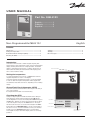
The thermostat has an intuitive menu, allowing it to be easily set.
Press OK to access the following options:
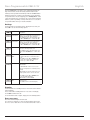
FLOOR TEMP
Displays actual floor
temperature.
SCALE HIGH
Allows you to set the highest temperature to
which the thermostat can be adjusted.
Press OK and change the temperature with
the UP or DOWN button. Confirm with OK.
SCALE LOW
Allows you to set the lowest temperature to
which the thermostat can be adjusted.
Press OK and change the temperature with
the UP or DOWN button. Confirm with OK.
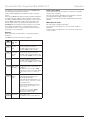
C°/F°
Allows °C (Celsius) or °F (Fahrenheit) to be
selected as the temperature unit. Press OK and change the temperature unit
with the UP or DOWN button. Confirm with
OK.
OFFSET
TEMP
Allows the difference in temperature between
the thermostat and a room thermometer to
be set.
Press OK. Press the UP or DOWN button
to set the offset temperature (in steps of
0.2°F/0.1°C). Confirm with OK
APPLICATION
Allows you to select FLOOR SENSOR or
REGULATOR.
FLOOR SENSOR: A floor sensor is used.
Only floor temperature is controlled. (Factory
default)
REGULATOR: The thermostat functions as a
simple regulator and no sensors are used.
Press OK. Press the UP or DOWN button
to select FLOOR SENSOR or
REGULATOR. Confirm with OK
EXIT
Exits the menu.
Press OK to return to the initial display.
Standby
The thermostat has a standby function, which turns off the thermostat and display.
Press and hold the Standby button for 2 seconds. The display
shows OFF and then turns off.
To turn the thermostat on again, simply press the Standby button.
Error messages
E0 = Internal failure. Replace thermostat.
E1 = Air sensor defective or short-circuited. Replace thermostat.
E2 = Floor sensor defective or short-circuited. Check floor sensor.
2
© 2009 Danfoss Inc.