1
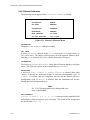
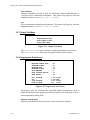
EC9850 SO2 ANALYZER OPERATION MANUAL 2.3.2 Using the Menu and Making Entries The EC9850 analyzer is programmed with a series of menus that allow the operator to view parameters, such as those generated by the microprocessor, or to enter digital parameters, when appropriate, or to select from among the choices displayed. The cursor is displayed as a movable highlighted area of text. (Letters appear as the opposite of the rest of the text on the screen.) 2.3.2.1 Screen Fields Screen fields that allow input are of two types: Choice fields Contain a fixed series of choices in a wraparound scrolling format. Digit fields Fields of programmable digital parameters in either wraparound scrolling or non-wraparound scrolling format. To select from among the choices in a choice field, first press the <Select> key to designate the field, then use the Up and Down arrows to highlight the desired selection. When the desired selection is displayed press the <Enter> key to confirm the entry. To set digits in a digit field, first press the <Select> key to designate the field and to highlight the different digits in the field. When the cursor indicates the digit you wish to change, press the Up or Down arrow key until the desired digit appears. Go to the next digit by pressing <Select>. When all digits of an entry are correct, press the <Enter> key to confirm the entry. Caution The <Select> key does not confirm an entry. You must press the <Enter> key. 2.3.2.2 Microprocessor-Generated Information Some fields, such as those on the INSTRUMENT STATUS and the SYSTEM TEMPERATURES screens, contain information generated by the microprocessor. The operator cannot affect the readings in these fields. (If you find that the cursor will not enter a field, the field contains microprocessor-generated information.) 2.3.2.3 Exiting Without Making a Change If you decide not to make a change during this process, simply press the <Exit> key, and the values will return to the previous entries. 2-12 98507600 Rev D