1
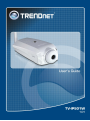
TV-IP501W Internet Camera User Manual
Table of Contents
About this User’s Guide ............................................................................................................................4
Before you start ........................................................................................................................................4
Packing List ..............................................................................................................................................4
System Requirements ..............................................................................................................................5
Default Settings ........................................................................................................................................5
Introduction ..............................................................................................................................................6
Features and Benefits .......................................................................................................................6
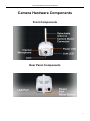
Camera Hardware Components ...............................................................................................................7
Front Components ............................................................................................................................7
Rear Panel Components...................................................................................................................7
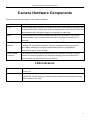
Camera Hardware Components ...............................................................................................................8
LED Indicators ..................................................................................................................................8
Hardware Installation ................................................................................................................................9
Mounting of Camera .........................................................................................................................9
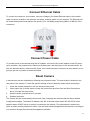
Connect Ethernet Cable..................................................................................................................10
Connect Power Cable .....................................................................................................................10
Reset Camera ................................................................................................................................10
Camera Applications ..............................................................................................................................11
Security ..................................................................................................................................................11
Software - Setup Wizard.........................................................................................................................12
Launching Setup Wizard for the first time .......................................................................................12
Browser Configuration ............................................................................................................................16
Accessing the Camera Video Display .............................................................................................16
Login...............................................................................................................................................17
Web Manager and Live Video Display Page ...................................................................................17
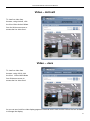
Video – ActiveX ..............................................................................................................................18
Video – Java ...................................................................................................................................18
Administration - Status Section .......................................................................................................20
System Page ..................................................................................................................................20
Video ..............................................................................................................................................20
Audio ..............................................................................................................................................21
Wireless ..........................................................................................................................................21
Network ..........................................................................................................................................21
Active Users ...................................................................................................................................22
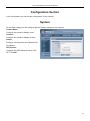
Configuration Section .....................................................................................................................23
System ...........................................................................................................................................23
Video ..............................................................................................................................................24
Audio ..............................................................................................................................................24
Wireless ..........................................................................................................................................25
2