1
Understanding reports
Spectrum CIRC/CAT reports help you document and manage your catalog and
circulation processes. You can print reports from the following categories: Material
Reports, Circulation Reports, Circulation Statistics, Circulation Notices, Labels,
Inventory Reports, and System Reports.
Most Spectrum CIRC/CAT reports are generated in your Internet browser window, where
you can preview and print them. The browser offers you many options for customizing
how the report displays and prints. It also creates one or more .htm files that you can use
in many ways, such as publishing them on an Intranet, e-mailing to other library staff or
administration, and so on. Circulation notices and labels are generated in a Spectrum
preview window rather than in your browser like the rest of the program reports.
Generating to a program window lets you easily position your notices and labels on the
page.
Note: An Internet browser is a program installed on your computer. You do not need
access to the Internet to use it. If a browser is not installed on your computer, you can
install it from the Spectrum CIRC/CAT Client CD. See "Additional programs/files
available on the CDs " in the Overview chapter of the Spectrum CIRC/CAT Installations
Guide for more information.
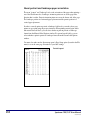
To access reports
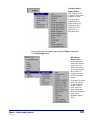
In the Navigator toolbar, click the Reports button. The reports
menu lists the seven report categories. From the reports menu,
choose the report category, then choose the report you want to
create. The report window that opens depends on which report
category you choose.
384
Spectrum CIRC/CAT User Manual
SCC5um1200kn