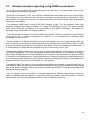
1
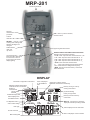
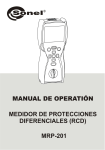
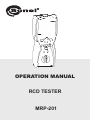
MRP-201
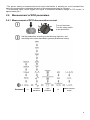
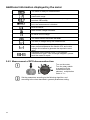
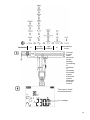
Measuring terminals
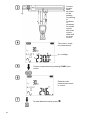
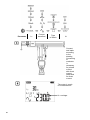
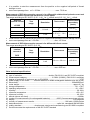
Start the
measurement
procedure
ESC - return to previous function,
exit the function
Contact
electrode
SET/SEL - - used for
entering meter settings and
selecting the digit to be
changed
Shift/selection:
right / left,
up / down
Approving selected function
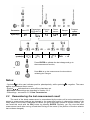
ROTARY SWITCH FOR SELECTING FUNCTIONS
Selecting the measurement function:
- tA 0,5x - RCD: response time measurement for 0,5IDn
- tA 1x - RCD: response time measurement for 1IDn
- tA 2x - RCD: response time measurement for 2IDn
- tA 5x - RCD: response time measurement for 5IDn
- AUTO - RCD: automatic measurement
- IA
- RCD: response/tripping time measurement
- U,f - measurement of voltage and frequency
- MEM - View and erase the memory content and
data transmission
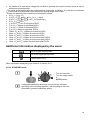
On and off function keep the button depressed
for some time to turn on
(in two steps) and off the
display lighting
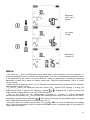
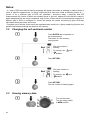
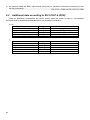
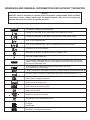
DISPLAY
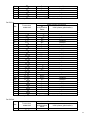
Parameter configuration mode active
Units of displayed
on the additional
field
Maximum allowed temperature
inside the meter is exceeded.
Ready for
measurement
L and N leads
switched
READY
Memory storing or memory
viewing mode active
SET
MEM
!
NOISE!
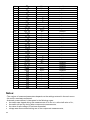
Additional display field
Values displayed on
the additional field
IDn multiplication factor
Safe contact voltage
RCD type
Current waveform
Main reading field
Interference voltage causing
additional measurement uncertainty
UN
IDn
IDn x1/25
UL =12.50V
AC
AB S G
Bank Cell
Memory bank and memory
cell number
V
mA
tAI
L-N
L-PE RCD
Symbol indicating
battery charge status
RE UBIA
ms?
mk
VHz
m A
Warning - important error message
displayed, read the operating manual
Values displayed on the main field
Units of displayed on the main field