1
Touch Graphical Interface Application Notes
rel. 30.07.13
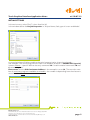
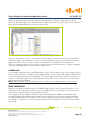
Define a starting Screen, with only a picture, for example an “Eliwell” logo, right key of the
mouse or by selecting Insert in the main menu, then select Static Picture, here you can select a
picture from standard library or from your picture file.
After the “Welcome” screen, it is possible to define others screen containing the wished information, by object “Screen Button” is easy to move to different screens, then there are several
objects to write a Text, to insert a Picture, to read/write a variable from Instrument, etc.
They are “intuitive, easy to use” functions, use the User manual for reference, and the examples
into the listed applications at the end of this document.
ALARM LOG
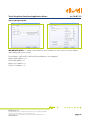
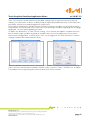
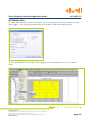
In standard list (project menu) of SKWorkshop, there is Alarm Log function. In this page is possible to check the status of one bit for each digital alarm, and the threshold (upper or lower limit)
of one analog value for each analog alarm. To see the log with the alarm status is necessary to
create a screen putting an Insert (top side main menu), then Alarm, then function Alarm Control or other similar available.
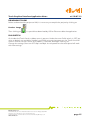
Note. HMI Parameter Setting of project menu, allows to set a beep sound in case of alarm.
DATA TRANSPORT
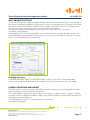
Below in standard list (project menu) of SKWorkshop, there is Data Transport function, it is an
important function because it allows to send variables from one Instrument to another one, or
from one Instrument to Touch Panel and/or viceversa.
It is enough to fill the Address field with Source and Destination address, and to define the
event that produce the updating of the data exchanged, this event can be a trigger (variable
to 1 defined by address) or a time, in this case it is necessary to set the time interval (in step
of seconds, 1s minimum, in case of more transfer with the same time, only the last one will be
executed).
Eliwell Controls s.r.l.
Via dell’Industria, 15 • Zona Industriale Paludi • 32010 Pieve d’Alpago (BL) ITALY
Telephone +39 0437 986 111 • Fax +39 0437 989 066
Technical helpline +39 0437 986 250 • E-mail eliwell.freeway@invensys.com
www.eliwell.com
page 8