1
Chapter 4: Programming Environment
The Options Dialog
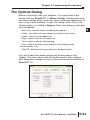
Before continuing to edit your program, it is a good idea to get
familiar with the DirectSOFT 6 Options Dialog. This dialog actually
has seven dialogs within which are used to setup the appearance of
each of the views available. To open the dialog, either click on the
Options button or on View > Options. Each view dialog is indicated
by a tab labeled:
• Data View - used to monitor and debug the program
• Global - this affects all views (display of aliases or nicknames)
• Ladder - options for the ladder view
• Stage - options used for the stage view
• Trend - options used for data trending
• XRef - used to setup the cross reference view (display mode,
documentation, etc.)
• XRef DB - definitions for cross reference database queries
Only the Global and Ladder options will be discussed in this
chapter. The other option tabs will be discussed in later chapters
after adequate coverage of some of the more advanced features of
DirectSOFT 6.
DirectSOFT 6 User Manual, 1st Edition
1
2
3
4
5
6
7
8
9
0
1
2
3
4
A
B
C
D
4-21