1
Introduction
Introduction
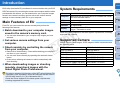
EOS Utility (hereinafter EU) is software for communication with your EOS
DIGITAL camera. By connecting the camera and computer with the cable
provided with the camera, you can download to your computer images
saved in the camera’s memory card as well as set various camera
settings or shoot remotely from EU on your computer.
System Requirements
Main Features of EU
From EU, you can control the camera remotely and perform the
following main features.
O Batch download to your computer images
saved in the camera’s memory card.
O Shoot remotely by controlling the camera
from your computer.
Mac OS X 10.6.8, 10.7.2
Computer
Macintosh with one of the above OS installed and a USB
port as a standard feature
CPU
Intel processor
RAM
Minimum 1GB
Interface
Hi-Speed USB
Display
Resolution: 1024 × 768 or more
Colors: Thousands or more
Check the Canon website for the latest system requirements, including
supported OS versions.
O You can also download to your computer only images you have
selected.
O Set various camera settings from your
computer.
OS
Y
P
O
Supported Camera
Can be used for RAW images, JPEG images or MOV movies shot with
the cameras below.
C
O Remote Live View shooting – Shoot while checking your subject in
real time on your computer.
O You can also shoot remotely by operating the camera’s shutter
button.
O Preset a time allowing the camera to shoot automatically with
timer shooting.
O When downloading images or shooting
remotely, view/check images with the
linked Digital Photo Professional.
The wired or wireless LAN functions of the WFT series Wireless File
Transmitter (sold separately) cannot be used with the Mac version
of EOS Utility Version 2.11 (as of November 2011).
Check the Canon website for the latest system requirements,
including supported OS versions.
EOS-1D Mark IV
EOS-1Ds Mark III
EOS-1D Mark III
EOS 5D Mark III
EOS 5D Mark II
EOS 7D
EOS 60D
EOS 50D
EOS 40D
EOS REBEL T3i/600D
EOS REBEL T2i/550D
EOS REBEL T1i/500D
EOS DIGITAL REBEL XSi/450D
EOS REBEL T3/1100D
_
EOS DIGITAL REBEL XS/1000D
Contents at
a Glance
1
2
3
4
Downloading
Images
Camera
Settings
Remote
Shooting
Preferences
Reference
Index
2