1
I
t+lx
S.uhgr
.
-... ...'-'. . --:
8.tlhg.
I
-..1
!
Buetooth
w&a
E
E
,We
irod€
Se&+h1fiq-,
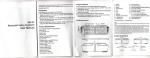
the success of search equipment, click on ,'Bluetoolh Keyboard,, to conne€f,
will appear a group offigures on the screen, then key in the figures and press
on Bluetooth keyboard to confirm.
I
i
Aud@th
I
I
Hffi
O
r':.
Eurtodh Keyborr,
Conr:ecfed
@
Note: After a su@essful pairing, only need switch the power to turn
on the Bluetooth
devie for the next use ,Bluetooth keyboard will automatically connect to the last
device, no further paiing opeEtion.
FAQ
Q1: Why my tablet can nol be connected to Bluetooth keyboard?
A: 1) Please check whether the Bluetooth keyboard is in pairing mode, and lhen
turn on the Bluetooth of tablet to search and connect.
2) Check whether the Bluetooth keyboard power is suffcient.lt cannot be
connected if it Iacks of powen Connect Bluetooth keyboard after fully charged.
Q2: How to use the shortcuts function on the Bluetmth keyboard?
A: The way is to press keys of ,,Fn +shortcul ..
Package List
Mutifunctional Bluetooth Keyboard Case *1
Bluetooth keyboard pairing connection is successful
User Manual *1
USB Charging Cable *1