1
@
Specifications
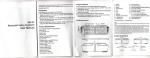
As the pictures, pressing the adjusting button, at the same time take the
stand to another side to ssparat€ it from th€ koyboard case.
@
Stand and keyboard can be completely separatsd, And thoy can be ussd
Product namor lPad Alr
Multlfunoilonal Bluotooth Koyboard Case
independently.
Modclr IBK-06
Distance: 10M
Charge: DCSV
Battery: Built-in 3.7V 250mA
1,
HOtVlE
10,
Volume control
2'
Reduce brightness
11'
12'
Bluetooth pairing
3' lncrease brightness
4' Switching virtual keyboard
5'
Lock bracket switch
6.
7,
Search
8'
Music control
Function Feature
L
Mute
r For lOST aystom, 360 degrees folio case.
Note: shortcuts: Fn + shortcut key
Metgrlel: ABS
Slzer 246 ' 187,5
'
lithium battery
Standby: 70 days
Continuous working time: 80 H
Applicable devices: iPad Air
26.9mm
Welght: 4609
Bluctooth: Bluctooth 3.0
Lock bracket switch
Charge light
13, Capitalize light
14'
15'
Bluetooth paring light
16.
17.
l.ock
Power key( on/off)
tulicro USB slot(charge slot)
r Bullt-ln 260mA lilon battery, continuous working time up to 80 hours, standby
70 dayr.
o
Adopt Broadcom 8CM20730 Bluetooth 3.0 chip.
. Sclltor koy cor€, typlng easy and versatile QWERry keyboard.
lnstruction
1
Product Structure
,
2,
Turn on the power of Bluetooth keyboard.
Press the paiing button on Bluetooth keyboard, and the Bluetooth light will
flash, the Bluetooth keyboard is in paring status.
Bluetooth Pairing Light
BLuetooth Pairing Key
keyboard power key
trtrtr8ttrtrtrtrtrtr
trtrtrtrtrtr[]
o@
O
Open the ce8e, pr6ss the rotation button with your thumb and forellngar
abov6 plctur6s.
@
Gently remove the case, then it separates from the stand.
trtrtrtrE1trtrtr
r!
tho
3'
Open Bluetooth of the device you are using, and search the device
named "Bluetooth Keyboard'.