1
Useful Optional Services
■ Call Transfer
No application required
Monthly charge: free
■ Call Barring
No application required
Monthly charge: free
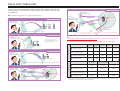
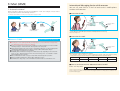
●Calls to your SoftBank 3G can be forwarded to a phone number (handset,
fixed-line phone, PHS, etc.) in Japan specified in advance.
●Calls/data transfers will be forwarded when your phone is out of range, in
the middle of a call, switched off, or if you do not answer within the number
of seconds specified in the settings.
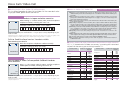
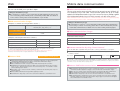
●You can restrict Voice Call, sending and receiving SMS, and other types of
communication. Useful for preventing unnecessary charges from incoming
calls when using Global Roaming Service.
●You can set, cancel, and check restrictions from your handset.
●A recorded message will be played to callers whose calls are restricted.
*When using Call Transfer, a communication charge will be applied if a call/data transfer is forwarded from overseas to Japan.
*Call Transfer and Voice Mail cannot be used at the same time. *Some local carriers may not support this service.
*Call Restriction settings differ depending on your model. For details, please see your User Manual. *Some local carriers cannot
be used.
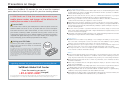
Important!
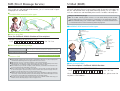
Types of Outgoing Call Barring
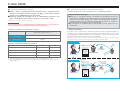
Any communication charges incurred for calls/data transfers forwarded from
your SoftBank 3G to another phone will be billed to you.
All Calls
Restricts all outgoing calls except emergency numbers.
*When you use "forward after ringing" abroad, you will be charged for receiving each call/data transfer in the country you are in
and for the call forwarded to Japan. If you use "forward without ringing", only domestic communication charges will apply.
All International Calls
Restricts all outgoing international calls.
Some International Calls
Restricts all outgoing international calls except those from the country you are in and Japan.
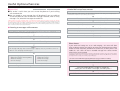
● To set Call Transfer from overseas
Dial +81-90-665-14070
*If you're dialing from a fixed-line phone, enter the international call prefix of the country you are visiting instead of "+".
For international call prefixes of major countries, please see page 6.
Types of Incoming Call Barring
All Calls
Restricts all incoming calls
All Calls while global roaming
Restricts all incoming calls while overseas.
Enter your mobile phone number followed by #
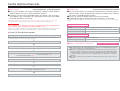
■Notes on PIN code for Call Barring
Enter your network PIN code followed by #
*Your network PIN code is the 4-digit PIN code you selected on your contract application.
Enter one of the service numbers followed by #
To forward after ringing : 441
To forward without ringing : 432
To cancel Call Transfer : 400
Please read the following notes.
●The default setting for the Call Barring PIN code is the same as the 4-digit PIN code (network
PIN code) you selected on your contract application.
●PIN code for Call Barring can be changed on your handset. However, please note that if you
enter the wrong PIN code three times, you will no longer be able to change Call Barring settings.
Should this happen, you will have to change the Call Barring PIN code and the network PIN
code (the procedure can be carried out at a SoftBank Shop), so be careful not to forget your
PIN codes.
●For details on PIN codes (network PIN code /Call Barring PIN code), please check your User
Manual.
Press 1
Enter the phone number for forwarding calls/data transfers, followed by #
To forward voice calls, press 1
To forward data communications, press 2
Press # to complete set-up.
12