1
Section 4
Streaming
This chapter details the MX2400's setup options.
This information is for technical staff; who operate
the unit does not require knowing this details of
settings.
The first section briefly describes the configuration
procedure and implementation for the two modes of
transmission: with a streaming server and direct to
an IP. This last mode -Direct to an IP- requires
advanced knowledge in computer networks. We
recommend working with a specialist. The second
part of this chapter describes advanced configuration
options for transmission and reception. Whatever
stage of work, two aspects must be considered:
•
The way the MX2400 access to Internet, which
depends on the facilities available in each
work area (WiFi networks, 3G/4G, or cable
access points).
•
The way that the streaming is done: direct to
Studios or through a streaming server. This is
defined once and dependent on the
infrastructure and needs of the radio.
3. Activate the "streaming" button on the front
panel.
4. Using a laptop, tablet or smartphone, scan
for available WiFi networks. A new network
called "MX2400" will appear.
5. Connect the Wi-Fi device to the "MX2400"
network (password: streaming)
6. Using a web browser, go to 192.168.0.90.
The MX2400's AoIP panel will open.
7. Select
CONFIGURATION.
In
the
"Streaming" section, define the IP address
to which the console will stream. When
turning on the MX2400 in the work area, it
will start to transmit to that IP address. No
matter how the Internet access was made
(3G, WiFi, or cable).
If working with streaming server:
a) Enter the server IP address supplied by
the ISP (streaming server) and enter
the password in the SECURITY section.
By default, the MX2400 uses the
Solidyne's Test Server. When the link
with studios is made with a Streaming
Server, once the configuration is done,
the connection to this server take place
automatically each time the console is
turned on, no matter where it are
located.
The first aspect is discussed in "Chapter 3 Scenarios of work".
The second aspect involves making a decision about
how the communication will solve. To make a direct
connection to studios, the radio station needs a fixed
IP address, and the settings of the network presents
greater complexities. The advantages: a) lower delay
times and b) is not required to hire a third party
service (streaming server). But using a streaming
server simplifies the initial configuration of the
system, facilitating the use of the MX2400 by nontechnical personnel. Under this mode, the console,
once programmed in the studies, only needs to be
turned on at the workplace. By other hand, the
streaming server is not an expensive service.
In both cases, the main setting for the transmission
of streaming involves the definition of the destination
IP address; to where the MX2400 will upload the
stream.
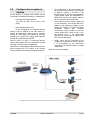
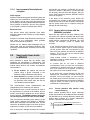
4.1 Settings for the AoIP
The configuration of IP audio module is accessed
using any WiFi device (laptop, tablet, smartphone).
If working with fixed IP:
b) Enter the destination IP address. That
is, the IP address of the Studios.
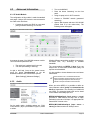
8. At menu Setup, the AUDIO option allows to
define quality and coding. Default is MPEG1 / 32KHz / Mono / Quality = 4. As a
reference, we also recommend listening to
the audio clips available on our website
(www.solidynepro.com; look for MX2400 in
<Products> section).
Arriving at the working area, the reporter just turn
on the MX2400 and enables the Internet access
(fixed or mobile) to start transmitting.
1. Check in the rear panel the presence of the
patch-cord joining the "Ethernet streaming"
and "3G LAN".
2. Turn on the MX2400.
SOLIDYNE
CODEC–MIXER MX2400
Page 21