1
Sample Draw/Data Logger– Manual
CO2Meter.com
Zero or Fresh Air Calibration
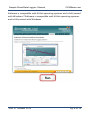
Apply gas and select the appropriate concentration and Click the “Calibrate” button. The sensor reading should instantly reflect the calibration. NOTE: DO NOT ADJUST THE SPAN VALUE. Support
The quickest way to obtain technical support is via email. Please send all support enquires to support@co2meter.com. In your email, please include a clear, concise definition of the problem and any relevant troubleshooting information or steps taken so far, so we can duplicate the problem and quickly respond to your inquiry. Warranty
This unit comes with a 1YEAR (warranty period) limited manufacturer’s warranty, starting from the date the unit was shipped to the buyer. During this period of time, CO2Meter.com warrants our products to be free from defects in materials and workmanship when used for their intended purpose and agrees to fix or replace (at our discretion) any part or product that fails under normal use. To take advantage of this warranty, the product must be returned to CO2Meter.com at your expense. If, after examination, we determine the product is defective, we will repair or replace it at no additional cost to you. This warranty does not cover any products that have been subjected to misuse, neglect, accident, modifications or repairs by you or by a third party. No employee or reseller of CO2Meter.com’s products may alter this warranty verbally or in writing. Rev. 27 October 2014
Pg. 13 of 15