1
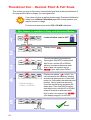
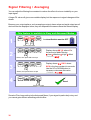
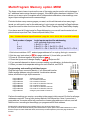
Theoretical Cal. - Decimal Point & Full Scale
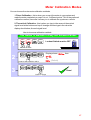
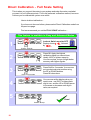
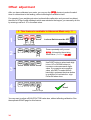
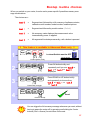
This is when you type in the sensor’s theoretical signal level at the top and bottom of
its range and the value to display, for each signal level.
!
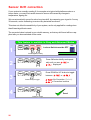
If you have not done so before, please select Theoretical Calibration
mode from the Meter Calibration page AND choose whether your
input is current or voltage.
First we recommend you set the FULL SCALE calibration ...
This feature is available in Easy and Advanced Modes
Set1
1
Digit
Set2
Output
Alarms
Max/Min
Reset
OK
OFF
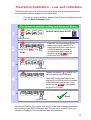
Lockout Switch must be OFF
Circuit board
ON
Press 3 seconds
Set1
2
Digit
Set1
Digit
Set2
Output
Alarms
Max/Min
Reset
OK
Set2
Output
Alarms
Set2
Output
Alarms
Max/Min
Reset
OK
Max/Min
3
Set1
Digit
4
5
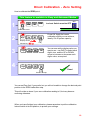
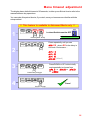
You can now specify the maximum
input signal. Use DIGIT to select each
digit in turn, and the UP or DOWN
OK
Reset
arrow to increase or decrease each
digit’s value, as required. eg set
Press to accept 20.0000 if your high input is 20mV
Default scaling is
0-40mv = 0-40.000
Set1
Digit
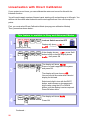
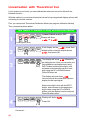
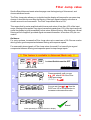
Display shows theor
Set2
Output
Alarms
Max/Min
Reset
OK
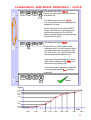
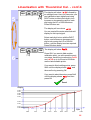
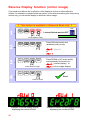
Display now shows rd Hi briefly. You
can now specify the maximum reading
and decimal point position. Press Set2
button for 3 seconds to set decimal point
position. Use up and down arrows to
move the decimal point and press OK
when done. Then, use DIGIT to select
each digit in turn, and the UP or DOWN
arrow to increase or decrease each
digit’s value, as required. Set 100.000 if
your display range is 0 to 100.000
Done!
Press to accept
22