1
VONETS——VAR11N 150M Mini WIFI Router
5.4
LAN Settings
In LAN Settings, you can set up the router local area network IP address and Subnet
mask, the user of local area network can manage this VAR11N WIFI router by this IP
address. For ordinary families sharing the internet, no need change the IP address of
LAN port, keep the default value is ok.
5.4.1 Basic Settings
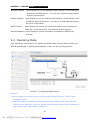
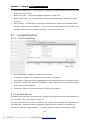
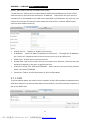
Choose LAN Settings-----Basic Settings, you can see the following diagram and
configure the network parameters of LAN port.
Input the IP address of VAR11N WIFI router to local area network. In
IP Address:
local area network, all IP Address should be the same segment as this
address and the default gateway should be IP address. The default of
factory is 192.168.1.254, it is C type IP address, is suitable for small
network less than 200 computers, you can change it based on
networking needs.
Subnet Mask: Choose the subnet mask of VAR11N WIFI router to local area network.
The corresponding subnet mask of C type is 255.255.255.0., to ensure
network access normal, please don’t change subnet mask. You can
choose different subnet mask according to real type of local area
network and IP address.
MAC Address:
The MAC address of this VAR11N WIFI router, it used to identify local
area network.
DHCP Server:
If DHCP server is enable and configure the method of obtaining IP
23
PDF 文件使用 "pdfFactory Pro" 试用版本创建 www.fineprint.cn