1
octopus - MIDI Control Sequencer
XI General tools
You may observe at times that the CPU is overloaded while the
MIDI pipes are not. This means that the CPU is busy doing stuff
other than sending MIDI. One probable explanation is that you are
probably making extensive use of the track speed multipliers.
For your understanding, a track playing at 4x speed uses roughly 3
times more CPU cycles than a track playing at 1x speed.
Under respective circumstances it is possible to achieve CPU overload even at very low tempo values, i.e. if a big enough data stack
awaits to be processed, but as a general rule, lower tempo values allow
for more load to be handled.
Final remarks
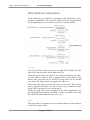
Note that the two bottlenecks are serially connected, CPU first,
MIDI second. They also know of each other in the sense that if a
MIDI pipe is full, the CPU will not process for it more data (it gets
dropped anyways) until it sees that the data really gets sent out of the
MIDI pipe.
This is to save resources for other tasks such as executing key presses,
rotary turns, or display updates.
When Octopus is under very high load, you may possibly see slight
glitches of the display.
For example, it may seem that the chaser light is not being moved
correctly. This is just a visual issue and may occur because sequencer
operations have higher priority than processing visual data.
System design flaw?
This leads us to our final remark, since this topic did raise some questions in the past: we are confident, and time has proven us right, that
the amount of resources available under the “clip” level of the overload protection mechanism is in no way representing a constraint to
the user’s work, and we do not see an issue.
To translate into an analogy from the synthesizer world, we rarely see
an issue if the number of voices available does not correspond to the
number of keys on the keyboard.
By the same token, a synthesizer with a 61 key keyboard and polyphony below 61 is surely not subject to a flawed design.
131
Navigation Guide