1
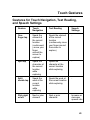
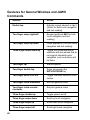
Gestures for General Windows and JAWS
Commands
46
Gesture
Action
Double tap
Activate current element or tap it
(Works for both touch navigation
and text reading)
Two-finger swipe right-left
Escape (performs ESC for both
touch navigation and text
reading)
Two-finger swipe up-down
Close application (For both touch
navigation and text reading)
Three-finger swipe down-up
Toggle text review window for
elements with text names that do
not support standard cursor
navigation, such as buttons and
list items
Two-finger tap
Silence speech
Two-finger double tap
Same as pressing the
APPLICATIONS key
Two-finger pinch in or out
Toggle Windows semantic zoom
feature
Two-finger rotate clockwise
Set next gesture mode
Two-finger rotate counter
clockwise
Set prior gesture mode
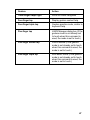
Three-finger double tap
Toggle speech on/off
Three-finger swipe down
Scroll up touch navigation
Three-finger swipe up
Scroll down touch navigation
Three-finger swipe left
Scroll right touch navigation