1
Console programming tips revisited The complete collection of Strand News programming tips by Rob Halliday
Welcome to the Collected Console Tips!
Over the last couple of years, Strand’s Quarterly Newsletter has featured a console programming tip in every
issue. These started partly as a response to people asking for advice, and partly as a response to the occasional
comment from people (-usually people who hadn’t actually used the products!) that Strand’s consoles were
somehow ‘not proper moving light consoles’.
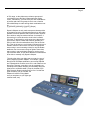
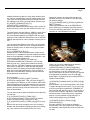
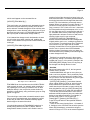
The proof is in the shows, though. Over the last nine years, this console has been my ally through countless
productions of all types and sizes. The British tour of Blood Brothers was the first. A year later, Martin Guerre
and Jesus Christ Superstar in the West End. In the time since then shows including Les Misérables around the
world, Oklahoma! in London, New York and on tour around the USA, Oliver! in London, Australia and now an
American tour. Miss Saigon, where one Strand 520i replaced the four control systems that had previously been
necessary to control that show’s complex lighting rig. Most of the shows in London and around the UK run on
these consoles. This autumn Strand’s consoles will be found controlling some of the biggest new shows in the
West End, including The Woman In White and Mary Poppins. With many of these shows the consoles are not
even just being moving light consoles: they are being lighting consoles, controlling entire rigs, combinations of
large numbers of moving lights, conventional lights, colour scrollers, projectors, smoke and haze machines and
much more besides. These consoles let programmers do what they need to do for this kind of show quickly, efficiently and reliably. They have extra tools useful when working as a lighting team - the off-line editor, handheld
remotes, the dongles allowing laptops to be remote controls and video displays, multi-user capability. The software continues to improve, adding new features in response to user comments and the demands from new lighting technology. Most importantly, people trust them.
What is true is that the consoles don’t necessarily score well in those short trade show demos. They are not
flash-bang consoles. They won’t patch your rig, create your effects, plot your show and pour you a drink with the
press of a button. They’re a bit like control system construction kits: you have to invest a little time, but you can
make them work in a way that suits you. And once you’ve set them up you can move that set-up with you from
show to show, thanks to the console’s ability to load and merge parts of shows and to quickly modify information
through ranges of cues, groups, effects and submasters.
The Console Tips were intended as a way of showing you how to make the best use of that tool: tricks and tips
for setting things up and using commands in ways that people don’t necessarily know they can be used. They’re
not a replacement for a manual: the manual (and console help file) will tell you the syntax of a command: the
how but not the why. In any case, most people
don’t read manuals! The Console Tips are a ‘real
world’ guide, led by tasks you might need to perform on a show. Make a channel a bit brighter
through all the cues? You could do that one cue
at a time, but a quicker way would be to use the
powerful UPDATE command. Replace one light
with another? Again, you could do it manually but
why not use AUTOMOD?
These things, and more, are now gathered together here. I hope you find them useful. And if
you have specific problems or questions, let us
know and maybe a future Console Tips will give
you the answer: email
console.tips@strandlighting.com.
Rob Halliday.