1
Execute a QuicKey™
This Action activates a QuicKey or Sequence created with CE
Software’s QuicKeys™. This Action is only available if you
have QuicKeys installed in your system. This gives you a
simple means to automate many tasks when you don’t need a
complex script.
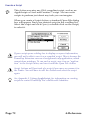
When you create a QuicKey Action, a list of your currently
defined QuicKeys appears. Select the Keyset that contains your
QuicKey from the pop-up menu above the list. Select the
desired QuicKey from the list and click OK (or double-click on
the QuicKey).
Type a Keystroke
This Action “types” a key combination as if you typed it on the
keyboard. You can use this Action to do menu commands or
type a character for use by any application.
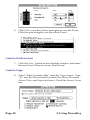
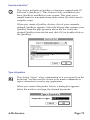
When you create a Keystroke Action, a dialog box appears.
Select the text box, and type the desired keystroke.
4: Reference
Page 73