1
TRANSACTION SCREENS AND PROCEDURES
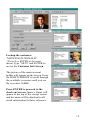
Entering A New Customer Press “N” at the main menu.
The only entries required for a new customer is the Name and Number.
The customer name should be entered last name first, followed by a
comma and a space, the first name, a space, and finally the middle initial
with no period. If this format is followed for every customer then UltraVideo will warn you if there is a duplicate entry.
UltraVideo will allow you to enter a specific customer number up to
seven numerical digits. The last entered number +1 will be suggested. If
you want to use this number then just skip the entry. Use the TAB key to
move between entry fields. If you wish, the record may now be saved by
pressing [enter], allowing the rental process to proceed. Other information can be added later if the store is busy and you want to immediately
rent.
Enter the Street address. The City, State, and Zip code will already
appear based on the local information entered during set up. Enter the
Phone number and Birth date. Note: It is important to enter the birth date
if the Ratings Control feature is to be used.
69