1
Chapter 3 - Home Gateway Utilities
VPN Client
A virtual private network (VPN) is the extension of a private network that
encompasses links across shared or public networks like the Internet. A
VPN enables you to send data between two computers across a shared or
public intranet in a manner that emulates the properties of a point-to-point
private link. The VPN Client utility help you to create and configure the
VPN connections.
Starting VPN Client
Click the Windows Start button, point to Programs, point to ASUS Wireless
Homegateway Utilities, and then click VPN Client.
3. Utilities
Main Window
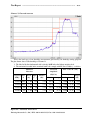
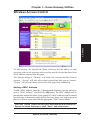
The main windows shows all the available VPN connections on your system.
Click Make New Connection to open the VPN Connection Wizard. Follow
the instructions on the next page to create a new VPN connection. When
you finish, the VPN connection name will appear in the list box.
60
SpaceLink Home Gateway