1
ProPresenter 4 for Mac User Manual
Working with Presentations
From the very beginning, ProPresenter was designed to make creating a presentation
simple. ProPresenter 4 makes this process even easier. This section will cover
everything you need to know about making a simple presentation, as well as how to
create more complex presentations and how to control those presentations. As with
previous sections, some features related to creating a presentation will only be briefly
mentioned because they are covered in more detail later in this user manual.
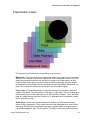
As explained in the Getting Started section, ProPresenter uses several different layers of
display elements to create dynamic presentations. Primarily, your presentations will
consist of slide objects and backgrounds. Slide objects, named because they exist within
individual slides, can be lyrics, videos (with or without audio), audio files, or still graphics
that will float above chosen background elements.
© 2011 Renewed Vision, Inc.!
45