1
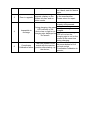
pressed.
3
4
5
Dead or frozen during
upgrade, display on the
Error in upgrade
screen is frozen and no
button works.
Take out the battery, then
put it back, start the device
again.
This fault can only be fixed
by the manufacturer.
Please return for repair.
If the charger is connected
properly and powered.
Charger is damaged.
During charging, the green
Battery is damaged or full
LED indicator of the
Impossible to
charged.
device has no light or no
recharge
It is normal when the green
charging sign displayed on
LED is lit on but the
the screen.
charging sign is not on the
screen at the same time
during charging.
Power off and then press
The click position is not
the power button for 6-9
Coordinates
match with the reaction
seconds, select
Calibration failure position after starting up
Coordinates Calibration to
the device。
operate。