1
Registering the Last Incoming Number
Using the Dial Pad
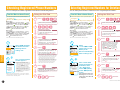
Register the last number to call you.
●After the nuisance call has ended, perform the following operation:
●The last answered incoming call or the last call recorded in the Voice Memo function can be registered for call blocking.
●When an incoming call is received but not answered; when the call is made by you; when the caller, using the Voice Mail Service,
Short Message Service (SMS), or other service, leaves a message at the Center; or when the call is made from overseas or the
caller otherwise cannot be identified, you cannot register the phone number of the other party in the call blocking system.
●You can easily set call blocking for the phone number of the most recent incoming call by following a simple
procedure immediately after receiving the call, even if the call was made from a phone with its caller ID blocked.
●If an incoming call made with a blocked caller ID is received and the phone number has been registered,
subsequent incoming calls from that phone number will always be rejected, even when its caller ID is on.
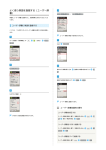
From the i-Menu or dmenu Screen
From the Handset Screen
*Use of the service requires an i-mode or sp-mode subscription.
To navigate to 1
Nuisance Call Blocking Service Settings Site
●From i-Menu
Select "お客様サポート"(Customer Support).
Select
"各種設定(確認・変更・利用)"(Various Settings[Checking,
Changes, Use]).
Select "その他サービス設定・確認"
(Setting and Checking of Other Services).
Select
"迷惑電話ストップサービス"(Nuisance Call Blocking
Service).
Enter the Network Password.
●From dmenu
Select "お客様サポート"( Customer Support).
Select
"各種設定の一覧を見る"(View Various Settings List).
Select "迷惑電話ストップサービス"(Nuisance Call Blocking
Service)from "あんしん・安全"(Assurance and Safety)
menu.
Enter the Network Password.
1
Nuis. call blocking
Register caller
Register selected No.
Delete last entry
Delete all entries
Check No. of entries
*
4
3
1
Press
Announcement
Announcement
"...To register the number of the
last call received, press 1 ..."
"Please enter your network
password."
See below if there are more than
30 numbers registered for call blocking.
See below
2
Display the Nuis.call
blocking Service
menu, and select
"Register caller."
(Network Password)
4
Announcement
"…To register phone numbers,
press 1 …"
1
Press
Announcement
"Operation completed."
A confirmation screen will appear.
Select "YES" to register the last number
to call you on your Call Blocking list. A
reconfirmation screen will appear.
Select "OK." If the Call Blocking list
registration is successful, a message to
this effect will be displayed.
5
Press
to finish.
See below if there are more than 30
numbers registered for call blocking.
See below
Select "登録"(Register) on the
"登録"(Register) screen.
If the Call Blocking list registration
is successful, a message to this
effect will be displayed.
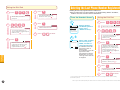
If you want to register a new phone number for blocking when
there are 30 numbers already registered, follow the following procedure.
If the total number of phone numbers registered using "Registering a Specified Phone Number" and "Registering the Last Incoming
Number" exceed the limit of 30, the "Procedure When the Amount of Blocked Numbers Exceeds the Limit" screen will appear.
This operation automatically registers the new number by deleting the oldest registered number.
The dmenu screen and the handset screen for a smartphone running the AndroidOS use the same procedures as shown below. Procedures may
*differ
depending on handset.
● From the i-Menu or dmenu Screen
登録
登録可能な件数(30
件)
を超えるため、現
在 登 録されている番
号から下 記の番 号を
削除して登録します。
よろしいですか?
×××××××××××
登録日:××年×月×日
登録
キャンセル
4
4
A confirmation screen will appear.
Select "登録"(Register) to delete
the oldest entry and add either a
specified phone number or the
phone number of the most recent
incoming call to the Call Blocking
list. If the entry is successfully
deleted, a message to this effect
will be displayed.
The screens shown demonstrate i-Menu
*procedures.
● From the Handset Screen
Overwrite
oldest entry?
YES
NO
A confirmation screen will appear. Select
"Yes" to delete the oldest entry and add
either a specified phone number or the
phone number of the most recent
incoming call to the Call Blocking list. If
the entry is successfully deleted, a
message to this effect will be displayed.
With FOMA or Xi, even if fewer than 30 calls are registered, you can
*delete
the oldest incoming call number registered for blocking by using
the service code
.
1 2 2
3
In addition, you can delete incoming call numbers registered for blocking,
in sequence from the oldest number by repeating this procedure.
If you want to register a new phone number for blocking when
there are 30 numbers already registered, follow the following procedure.
If the total number of phone numbers
registered using "Registering a
Specified Phone Number" and
"Registering the Last Incoming
Number" exceed the limit of 30, the
"Procedure When the Amount of
Blocked Numbers Exceeds the Limit"
screen will appear.
This operation automatically
registers the new number by deleting
the oldest registered number.
●
● Using the Dial Pad
1
Nuisance Call
Blocking Service
Nuisance Call
Blocking Service
確認
登録
■最後に着信して通話
した番号の登録
■番号を指定して登録
削除
1
See below
Select "最後に着信して通話した番号の
登録"(Registering the last Incoming
Number) on the Nuisance Call
Blocking Service settings site.
迷惑電話ストップサービス
Press
See below if there are more than
30 numbers registered for call
blocking.
The screens shown demonstrate i-Menu procedures.
1
1
Announcement
"The maximum register number has been exceeded.
Delete the oldest registered number and register this
number. To register, press 1 . To cancel, press 2 ."
1
Press
Announcement
"Operation completed."
2
Press
to finish.
The set up procedure may differ depending on the handset. See the user's manual of your handset for details. ● Actual screen may be different.
5