1
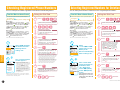
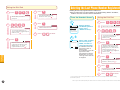
Registering a Specified Phone Number for the Nuisance Call Blocking Service
Specify a phone number to add to the Call Blocking list. You can register the number in advance for blocking.
can register up to 30 numbers. If the number of entries reaches 30,
the oldest number is erased when the next one is registered.
●Only one incoming number can be registered for blocking each time the procedure is carried out.
●Take care to avoid mistakes in entering numbers for incoming calls to be rejected.
●Incoming calls with the caller ID blocked are rejected if the phone number has been registered.
With the 902i series and later models, you can register numbers for incoming calls to be rejected using the Phonebook and outgoing and incoming call
*histories.
For more details, refer to the user's manual.
●You
From the i-Menu or dmenu Screen
*Use of the service requires an i-mode or sp-mode subscription.
To navigate to 1
Nuisance Call Blocking Service Settings Site
●From i-Menu
Select "お客様サポート"(Customer Support).
Select
"各種設定(確認・変更・利用)
"(Various Settings[Checking,
Changes, Use]).
Select "その他サービス設定・確認"
(Setting and Checking of Other Services).
Select
"迷惑電話ストップサービス"(Nuisance Call Blocking
Service).
Enter the Network Password.
●From dmenu
Select "お客様サポート"(Customer Support).
Select
"各種設定の一覧を見る"(View Various Settings List).
Select "迷惑電話ストップサービス"(Nuisance Call Blocking
Service)from "あんしん・安全"(Assurance and Safety)
menu.
Enter the Network Password.
From the Handset Screen
Nuis. call blocking
Register caller
Register selected No.
Delete last entry
Delete all entries
Check No. of entries
2
登録
登録したい番号を入
力してください。
※番号はハイフンなしで
入力してください。
×××××××××××
登録
キャンセル
2
XXXXXXXXXX
Set
3
Enter the phone number
to be rejected, and
select "登録"(Register).
YES
NO
4
4
4
Press
2
Announcement
Announcement
"Please enter the phone number."
"Please enter your network password."
-
5
2
(Network Password)
Announcement
(Phone Number for Call Blocking)
"You are in the main menu. To register
phone numbers, press 1 . To check or
delete the registered phone numbers,
press 2 . To exit, press the ♯ key."
With landline phones, register the number starting from
*the
area code; with mobile phones, start with 090 or
similar mobile phone prefix.
Announcement
"Operation completed."
See p. 5 if there are more than 30 numbers
registered for call blocking.
3
Press
1
To P. 5
Announcement
"XX phone numbers are currently
registered for the Nuisance Call Barring
Service. To register the number of the
last call received, press 1 . To register a
selected number, press 2 . To return to
the main menu, press the
key."
Enter the
phone number
to be rejected,
and select "Set."*1
XXXXXXXXXXX
Register?
2
Display the Nuis. call
blocking Service
menu, and select
"Register selected No.."
1
*1 When registering specified numbers,
note that when
is pressed before the
phone number is completely input, only
the numerals input prior to
is
registered. (Example) If when
attempting to register the number 0X0XXXX-△△△△, you actually press
"0
,"
0
then the numbers ("0X0-XXXX")
input prior to
are registered.
When using the dial pad for these procedures, you can still use it
*the
procedure you want to perform.
6
Press
to finish.
while announcements are playing if you happen to know how to carry out
Nuisance Call
Blocking Service
Nuisance Call
Blocking Service
確認
登録
■最後に着信して通話
した番号の登録
■番号を指定して登録
削除
■リストから選択して削除
■番号を指定して削除
■全件削除
Select
"番号を指定して登録"
(Registering a Specified
Number)
on the Nuisance Call
Blocking Service
settings site.
Press
1
Call rejection number?
迷惑電話ストップサービス
1
●These settings cannot be made from the handset screen on models prior
to the 902i series. Please refer to the sections on From the i-Menu
Screen or Using the Dial Pad.
*The screens shown demonstrate i-Menu procedures.
1
Using the Dial Pad
Select "Yes"
to complete the
registration.
See p. 4 if there are more than 30
numbers registered for call blocking.
To P. 4
If the Call Blocking list
registration is successful, a
message to this effect will
be displayed.
See p. 4 if there are more than 30
numbers registered for call blocking.
To P. 4
●
The set up procedure may differ depending on the handset. See the user's manual of your handset for details. ● Actual screen may be different.
3
68