1
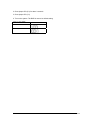
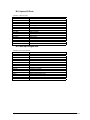
Table 2-1: IBC 2606 serial port default settings
Port
COM1
COM2
2.5
Address
3F8, 3E8
2F8, 2E8
Default
3F8/IRQ4
2F8/IRQ3
Ethernet Configuration (CN6 and CN7)
The IBC 2606 is equipped with dual high performance 32-bit PCI-bus Fast Ethernet interfaces
which are fully compliant with IEEE 802.3u 10/100Base-TX specifications. It is supported by all
major network operating systems and is 100% Novell NE-2000 compatible. Two on-board RJ-45
jacks provide convenient connection to the network.
The medium type can be configured via the software program included on the utility CD-ROM
disc. (See Chapter 3 for detailed information.)
2.6
USB Connector (CN4)
The IBC 2606 provides one USB (Universal Serial Bus) interface on the front panel. The USB
interface gives complete plug and play, hot attach/detach for up to 127 external devices. The IBC
2606 USB interface complies with USB specification rev. 1.0 and is fuse protected.
The USB interface can be disabled in the system BIOS setup. The USB controller default is
"Enabled" but the USB keyboard support default is "Disabled".
2.7
Card Installation
The CompactPCI connectors are firm and rigid, and require careful handling while plugging and
unplugging. Improper installation of a card can easily damage the backplane of the chassis.
The inject/eject handles of IBC 2606 help you install and remove the card easily and safely.
Follow the procedure below to install the IBC 2606 into a chassis:
To install a card:
1. Hold the card vertically. Be sure that the card is pointing in the correct direction. The
components of the card should be pointing to the right-hand side.
2. Pull out both handles to unlock it.
Caution: Keep your fingers away from the hinge to prevent your fingers from getting pinched.
3. Insert the card into the chassis by sliding the upper and lower edges of the card into the card
guides.
4. Push the card into the slot gently by sliding the card along the card guide until the handles
meet the rectangular holes of the cross rails.
Note: If the card is correctly positioned and has been slid all the way into the chassis, the handle
should match the rectangular holes. If not, remove the card from the card guide and repeat step 3
again. Do not try to install a card by forcing it into the chassis.
5. Pull the upper handle down and lift the lower handle up to push the card into place.
IBC 2606 User's Guide
21