1
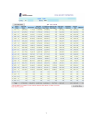
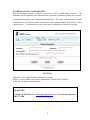
Notes: To save your changes, be sure to click the Update button before clicking Cancel, Reset, or Back to Main Menu. Once you revise an entry and click the Update button, you will not be able to view or retrieve the previous entry for that pay period. The data entry screen and the summary screen will display the updated request only. For this reason, it is important that you print out and maintain for your records copies of all original requests and adjustments for Social Security reimbursement. To illustrate how data is displayed once a reimbursement request is adjusted, refer to the summary screen on page 6 as you read the sections below. Reducing the State Share Payable after the Original Payment was Processed In the example shown on page 6, the district made an adjustment to pay period #7 that reduced the State Share Payable by $8,068.00. Only the adjusted figures resulting in the State Share Payable of $6,808.50 are displayed. The original entry that generated the payment of $14,876.50 has been replaced by the adjustment. The overpayment of $8,068.00 to the district was recovered by the State in two payments. As the district processed requests for pay periods #8 and #9, the State withheld the full State Share Payable for pay period #8 and a portion of the State Share Payable for pay period #9. The amounts withheld equal the overpayment, and both the overpayment and the recovered amount are displayed in the Difference column of the summary screen. The Payment History on the data entry screen for pay period #7 will show the original payment of $14,876.80. The Payment History for pay period #8 will show no payment since no amount was paid, and the Payment History for pay period #9 will show the partial payment of $9,697.88. Increasing the State Share Payable after the Original Payment was Processed Since the adjusted entry replaces the original entry, the State Share Payable column will now display the higher, adjusted amount due to the district. Once the payment for the adjustment is processed, the total paid to the district for that pay period will equal the adjusted State Share Payable. At that point, there will be no difference between the State Share Payable column and the Amount Paid column, and it will not be evident from viewing the summary screen that an adjustment was made. The Payment History on the data entry screen for the adjusted pay period will list multiple payments: the original payment and the additional payment as a result of the adjustment to that pay period. 10