1
radios.net.au : SCS Pactor Modem Installation & Instruction Manual
There are several ways to determine the Com Port
number is assigned to your serial connector, but
probably the quickest way is by trial-and-error. While
not particularly sophisticated, this method is fast, and it
works:
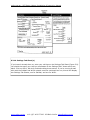
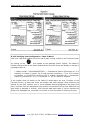
From the dropdown menu shown in Figure 5-2, select the first Com Port in the list click
APPLY,OK,and then click on the icon
in the Message Screen toolbar to start the
Terminal Screen. If you're lucky and have guessed correctly, your computer and the
modem will communicate, the modem will initialize, and your computer will display a
1 message similar to the following message:
2010/05/16 12:08 PTC-IIPro modem initialized OK
<Modem serial*. 01000008CD8E220DxProfessional [Pactor-3] firmware ver:
4.0, no Pactor-3 license, 20 P3 trial-connects remaining>
If your modem doesn't respond and you don't see the initialization OK message, go back
to the Message Screen, select TOOLS, OPTIONS, CONNECTION tab. and choose the next
Com Port number on the list. Continue the process until you find a Com Port number
that works. This approach only takes a few minutes and doesn't require an
understanding of com ports or your computer system configuration. If you go through
the entire list of Com Port numbers and still aren't having any success, double-check to
2
be certain that the correct modem model is selected, and try a different baud rate. If
they are correctly selected, it may be time to solicit help from a friend, or to seek
professional computer assistance.
Probable cause of non communication is that you have a com port conflict, com port is
switched off in your computer bios settings, your USB card is not installed correctly.
9.1.2 Get the Modem and Radio talking to Each Other.
Once the modem and the computer are happily chatting away, it's time to get the modem
and the radio talking to each other. Failure for the modem/computer and the radio to talk
to each other is usually caused by one or a combination of, these six things:
1
The Frequency Control Cable is connected to an incorrect connector on the radio (this
happens quite often with the lcom M-802).
2 The Radio Connection method chosen is incorrect.
3 An incorrect Radio Type (brand & model) is selected.
4 The selected Radio Baud Rate is incorrect.
The CIV-ADDR (hex} radio address does not match the address setting in the radio
5 (Icom
radios only).
www.radios.net.au
t. 61 (0)7 4125-7700 f. 03-8640-0419 e. sales@radios.net.au