1
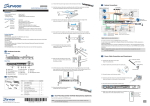
3.4. Cabling
Desktop System Connection Concept
IP Camera(s)
Analog Camera(s)
IP Encoder
Monitor
S MR
SE LEC T
E NT ER
Ethernet Con nection
USB Connection
Video/Monitor Connection
Note: Shaded areas are optional devices.
Connect cables to the rear panel ports as follows.
Insert mouse, keyboard to the USB port for installing Milestone
XProtect Server on the EMR system.
Insert the LAN cable to the LAN port to connect the EMR to a local
network where your IP cameras reside.
(Connection to analog cameras is also available via an IP encoder.)
Connect an external monitor capable of 32bit or higher color quality to
the VGA Port to view the Milestone XProtect interface.
24