1
number of runs with different initial guesses. We advise you also to analyse the
results very carefully (especially the confidence intervals of the estimated
parameters). We do not accept any responsibility for use of PEARLNEQ.
Running the example
The following steps must be followed.
1 Installation. PEARLNEQ is distributed in a self-extracting zip file. Run
unpack_pearlneq.exe and specify a path (e.g. c:\pearlneq). The package
contains three directories, i.e. Neq_Bin, pest and Neq_Example.
The Neq_Bin directory contains the PEARLNEQ executables,
PEARLNEQ.EXE and PEARLMK.EXE.
The PEST optimisation software is available in the pest directory. As PEST is
now available freeware (http://www.sspa.com/pest), we included the latest
version as of 29-10-2003 (version 7.0.1.). Separate installation of PEST is not
necessary.
The Neq_Example directory contains results from an example study, as
described in the PEARL user manual, page 51-54.
2 You can now run the example, to check if everything works and get experience
with the system. Go to the Neq_Example directory, and run the example,
example.bat.
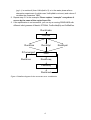
The batch file will first call PEARLMK. This pre-processing program generates
the input files for PEST, i.e. example.pst, example.tpl and example.ins.
Than the optimisation starts. PEST calls PEARLNEQ several times (in the
example 39 times).
If you get an error message after the first step (PEARLMK), type control-break
to stop the process and check the error messages available in the
example.err file.
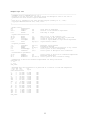
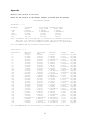
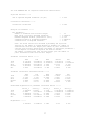
3 After successful optimisation, read the results from the file example.rec. The
relevant results, including parameter values, 95% confidence intervals and
correlation matrices can be found at the end of this file. PEST also generates
parameter sensitivity files etc. Details can be found in the PEST manual, which is
available in the PEST subdirectory of the package.
4 If you encounter errors during the second step, you can try running PEARLNEQ
directly. PEARLMK has created a file example.neq, which is the input file for
PEARLNEQ. Type ..\Neq_Bin\PEARLNEQ EXAMPLE. PEARLNEQ will create an output
file (example.out) and a log file (example.log). The output files are self-explaining.
5 You can use the XyWin program to make a graph. XyWin is available in the
neq_bin\xypearl directory of PEARLNEQ (the example job does this call for your):
..\Neq_Bin\xypearl\xywin –j example.job –W l
2