1
#
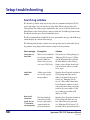
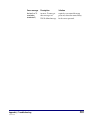
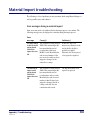
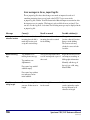
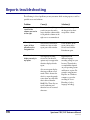
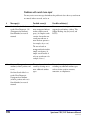
Message(s)
Possible cause(s)
Possible solution(s)
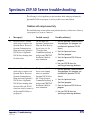
1.3
On server: Error 133 occurred
while trying to connect to the
Spectrum Server. Verify the
Spectrum Server is running
before starting Spectrum Z39.50
Server. Verify the number of
users has not exceeded the max
number of licenses allowed for
the Spectrum Server.
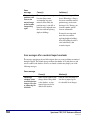
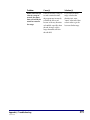
After the Z39.50 client
made a connection to the
Spectrum Z39.50 Server,
the Spectrum Server
(FairCom) was shut down.
Then the user sent another
search or browse request
from the Z39.50 client.
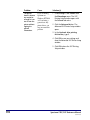
1 Stop sending new requests from
the Z39.50 client(s). (You must
close any client programs.)
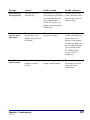
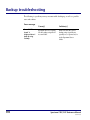
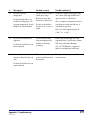
On server: Error 84 occurred
while trying to connect to the
Spectrum Server. Verify the
Spectrum Server program is
running before starting
Spectrum Z39.50 Server.
3 Start the Spectrum Server
(FairCom) program.
4 Start the Spectrum Z39.50 Server
program.
On client: Socket error: (10054)
Connection reset by peer.
1.4
2 Close the Spectrum Z39.50 Server
program.
5 Now you are able to send requests
again from the Z39.50 client(s).
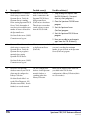
Maximum users exceeded
on the Spectrum Server
(FairCom).
Close some of the Z39.50 clients so that
you aren’t exceeding the maximum
number of users allowed on the Spectrum
Server (FairCom) program.
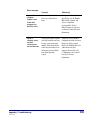
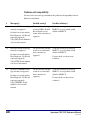
The user configured the
database for the Spectrum
material database as
something other than
Library-Collection.
Make sure the database name of the host
you added in the Z39.50 client
configuration is Library-Collection (this is
not case-sensitive).
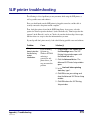
On client: Socket error: (10054)
Connection reset by peer.
1.5
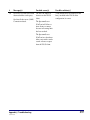
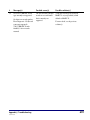
On server: The Spectrum
database name on your Z39.50
client must be configured as
Library-Collection.
On client: Search failed – no
results. Error Diagnostic: 109
(Database unavailable). Search
finished, no records returned.
596
Spectrum CIRC/CAT Reference Manual
SCC5rm1200kn