1
User Manual EML1101
8
8.1
8.2
8.3
8.4
8.5
8.6
8.7
8.8
8.9
8.10
8.11
8.12
9
9.1
9.2
9.3
9.4
9.4.1
9.4.2
9.5
9.6
9.7
9.8
9.9
9.10
10
10.1
10.2
10.3
10.4
11
12
13
14
15
16
17
17.1
17.2
17.3
17.4
17.4.1
17.4.2
17.5
18
18.1
18.2
18.3
18.4
18.5
19
19.1
19.1.1
19.1.2
19.2
19.3
19.4
Contents
Load settings 20
Load name ........................................................................................................................... 20
Priority .................................................................................................................................. 20
Power ................................................................................................................................... 21
Preference............................................................................................................................ 21
Channel Status..................................................................................................................... 21
Minimum OFF time............................................................................................................... 21
Maximum OFF time.............................................................................................................. 21
Minimum ON time ................................................................................................................ 22
. Group.............................................................................................................................. 22
Changing load settings of group channels........................................................................... 22
Output................................................................................................................................... 22
Function testing.................................................................................................................... 22
Printer routines
23
Printing basic settings .......................................................................................................... 23
Printing load settings............................................................................................................ 23
Power failures ...................................................................................................................... 23
Errors.................................................................................................................................... 23
Error list............................................................................................................................ 24
Resetting error counters .................................................................................................. 24
Printing present day's power curve...................................................................................... 24
Printing previous day's power curve .................................................................................... 24
Power maxima of the last 50 days ....................................................................................... 25
Power maxima of the last 48 months................................................................................... 25
Event list............................................................................................................................... 25
Deleting printer queue.......................................................................................................... 26
Add-on stations
26
Activating/deactivating stations............................................................................................ 26
Displaying stations ............................................................................................................... 26
Virtual add-on units .............................................................................................................. 27
Activating virtual EMD .......................................................................................................... 27
External synchronisation
27
Setting time 28
Counters
28
Write protect 28
Info device
28
Technical Data
29
Troubleshooting
30
Checking programmed values ............................................................................................. 30
Control on the instrument..................................................................................................... 30
Printout from a directly connected printer ............................................................................ 30
Checking the system when running ..................................................................................... 30
Standard display .............................................................................................................. 30
Display of switching channels.......................................................................................... 30
Sources of error ................................................................................................................... 31
Application instructions
33
Bus cable longer than 1 km ................................................................................................. 33
Shielding .............................................................................................................................. 33
Target Maximum Demand ................................................................................................... 33
Operating OPT-SW via modem ........................................................................................... 34
Technical terms/Glossary .................................................................................................... 34
Annex 36
Instrument software.............................................................................................................. 36
EML software update....................................................................................................... 36
Update preparation .......................................................................................................... 36
Table of settings................................................................................................................... 40
Form for Basic Settings........................................................................................................ 42
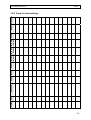
Form for load settings .......................................................................................................... 45
3