1
19-14
N30 Supervisory Controller User’s Manual
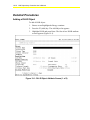
Commanding a DLLR Object
To command a DLLR object:
1.
Browse to and highlight a DLLR object.
2.
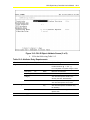
Press the F2 (Command) key. The Command field appears.
3.
Use the Spacebar and the Backspace key to cycle through the list
until the desired command appears. The DLLR object supports the
commands listed in Table 19-3.
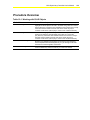
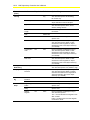
Table 19-3: Supported Commands
Command
Description
Force Register
Use this command only when necessary; for example, when
loads have been lost or when there are many changes to
the loads.
This command reinitializes connections between Load and
DLLR objects. Load shedding is suspended during this time.
Selecting False only updates the database while selecting
True clears out and then updates the database.
Enable
Allows the DLLR object’s functionality.
Disable
Prohibits the DLLR from sending shed load commands.
4.
If the desired command appears with additional parameters below
it, press the Tab key to highlight the field and either type in the
necessary information or use the Spacebar and Backspace key to
cycle through the list of options.
5.
Press Enter.
Deleting a DLLR Object
To delete a DLLR object:
1.
Browse to and highlight a DLLR object.
2.
Press Enter to open the object.
3.
Press the Delete key.
4.
Press the Tab key to confirm the deletion.