1
CREATING, BUILDING & DEBUGGING ZIGBEENET APPLICATIONS
IN AVR STUDIO
APPLICATION NOTE
Pre-requisites
Make sure you have the latest versions of AVR Studio/Service Pack
(http://atmel.com/dyn/products/tools_card.asp?family_id=607&family_name=AVR+8
%2DBit+RISC+&tool_id=2725) and WinAVR (http://winavr.sourceforge.net) installed
on your PC.
You’ll also need one MeshBean board [5] and Atmel JTAGICE mkII device.
Creating a New project in AVR Studio
1.
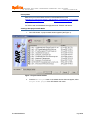
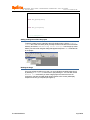
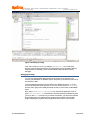
Start AVR Studio. A project wizard window appears (see Figure 1).
Figure 1. Project wizard window
2.
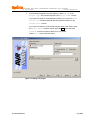
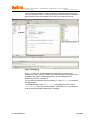
Press the New Project button. If the wizard window does not appear, select
Project -> New project from AVR Studio main menu.
© 2008 MeshNetics
Page 3/12