1
Table of Contents
Safety Precautions........................................................................................................2
Table of Contents...........................................................................................................3
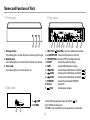
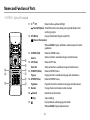
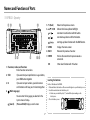
Names and Functions of Parts...................................................................................4
Front Panel..............................................................................................................................4
Side Panel................................................................................................................................4
Rear Panel................................................................................................................................4
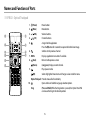
RF RCU - Optical Trackpad...............................................................................................5
RF RCU - QWERTY................................................................................................................7
Connections....................................................................................................................8
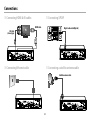
Connecting HDMI & AV cable........................................................................................8
Connecting ETHERNET cable.........................................................................................8
Connecting S/PDIF..............................................................................................................8
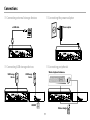
Connecting satellite antenna cable.............................................................................8
Connecting external storages........................................................................................9
Connecting USB storages................................................................................................9
Connecting power adaptor............................................................................................9
Connecting peripherals....................................................................................................9
Getting Started........................................................................................................... 10
Turning the unit on.......................................................................................................... 10
Turning the unit off.......................................................................................................... 10
RF RCU pairing................................................................................................................... 10
First-time installation....................................................................................................... 10
Basic Settings...................................................................................................................... 12
Satellite setting - Antenna type.................................................................................. 12
Satellite setting - Scan..................................................................................................... 12
Satellite setting - edit...................................................................................................... 13
TP setting - scan................................................................................................................. 14
TP setting - edit.................................................................................................................. 14
Deleting a channel........................................................................................................... 14
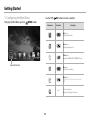
Configuring the Home Screen.................................................................................... 14
Viewing program information.................................................................................... 15
Using the status information menu......................................................................... 15
Using multi mode............................................................................................................. 15
Configuring the Main Menu........................................................................................ 16
3
CHANNEL...................................................................................................................... 17
CHANNEL configuration................................................................................................ 17
Using the sort menu........................................................................................................ 17
Advanced Channel List configuration..................................................................... 18
Using the channel sort menu...................................................................................... 18
Channel editor.................................................................................................................... 19
Favorite group.................................................................................................................... 20
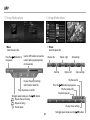
APP................................................................................................................................. 21
APP menu............................................................................................................................. 21
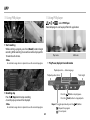
Using screen capture....................................................................................................... 22
Using iMedia player......................................................................................................... 22
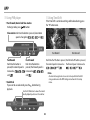
Using PVR player............................................................................................................... 24
Using TimeShift.................................................................................................................. 25
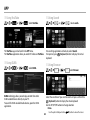
Using YouTube................................................................................................................... 26
Using DLNA......................................................................................................................... 26
Using Search....................................................................................................................... 26
Using Browser..................................................................................................................... 26
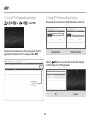
Using IPTV (Advanced Application)......................................................................... 27
Using xbmc (Advanced Application)....................................................................... 28
Using APK Installer (Advanced Application)........................................................ 28
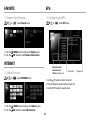
FAVORITE...................................................................................................................... 29
Remove from Favorites.................................................................................................. 29
INTERNET...................................................................................................................... 29
Add to Favorites................................................................................................................. 29
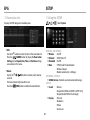
EPG................................................................................................................................. 29
Configuring the EPG........................................................................................................ 29
Viewing program information.................................................................................... 30
Using the sort menu........................................................................................................ 30
Add Reservation Recording......................................................................................... 30
Reservation List.................................................................................................................. 31
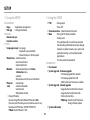
SETUP............................................................................................................................ 31
Using the SETUP................................................................................................................ 31
Managing applications.................................................................................................. 33
Troubleshooting......................................................................................................... 34
Specifications.............................................................................................................. 35