1
1. Abbreviated Terms
CAPTCHA Completely Automatic Public Turing Test to Tell Computers and Humans
Apart – here, an image consisting of 2 words used to prevent from automatic
non-human registration of users
OID automatically assigned by the system unique number of an outcome document
PID automatically assigned by the system unique number of a project
Note: Project(s) outcome(s) document(s), outcome and document refer to the document and its data uploaded as an outcome to a project.
2. Login to the System
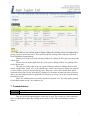
Registered users can login to the system using the login form. It can be accessed by clicking
or directly on
on the Login button from the navigation bar
http://gistandards.eu/bpc/login/.
The user provides a username and password. If these credentials are correct, the user
logs successfully to the system and is redirected to the home page of the system. The navigation bar changes according to the roles the user has and allows quick access to the main functionalities of the system.
If the data entered is incorrect, an error message is displayed.
There is a link at the end of the login form allowing non-registered users to register.
This registration form is reviewed in separate section.
3. User Roles
The system is accessed and maintained by users with different roles. The following ones exist
(in accordance with ISO 19135):
¾ Public User is any user accessing the pages of the system without being logged to it.
She/he can view the home page; read the public content of the Projects and Projects
Outcomes Registries; login to the system and request for registration.
¾ Registry Manager has access to the list of all users; can manually add new user, edit
user credentials and change each user’s roles.
¾ Register Manager has access to the list of new requests for registration; can evaluate
users (determines whether a user candidate should be accepted for working with the
system or not); can read, edit, delete and complete all projects and project outcomes
documents; can add new project / outcome.
¾ Control Body can read all projects / outcomes and can evaluate a project / outcome
submitted for evaluation by a submitting organization.
¾ Submitting Organization is a user accepted by the Registry Manager after submitting
a request. She/he can add new project; add new outcome to own or public (accepted
3