1
Editing
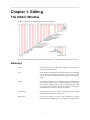
Show and Edit HTML Source
If you prefer to edit the html directly, you can. If you do not
properly close your tag pairs or make errors, the editor will change
and correct your code, however.
Paste as Text
Paste in content with all formatting and other information
removed.
Paste from Word
If you copy and paste content from Word, a browser, and other
applications like Evernote, you will inadvertently paste in styles,
formatting codes, and other content that will interfere with the
layout and consistency of the webpage. It will also make your
page difficult to edit and maintain. Use "Paste from Word"
when pasting from Word, web pages, and other applications
that contain formatting information. Things like bold, italics,
underline, indents, etc. will be retained, but font faces, id's, and
other application-specific information will be filtered out.
Show Blocks
When editing a page, it is difficult to know if a part of the page
is set as a header, a paragraph, or a div that was copied from a
browser or Word document. Use this feature to see a line around
all blocks which identifies the format of that block of text.
Remove Formatting
Select a block of text and then click this button to remove
formatting like bold, italics, Word styles, and other information,
but it will leave hyperlinks and paragraphs.
Format
The Format pull-down changes to show you the format of a block
when you click inside that block of text.
You don't have to select the entire block then change the format.
Just click inside a block, open the pull-down, and select the format
you want to give it.
Insert/Edit Table
Use this button to create tables. Click inside a table and then click
this button to change the table properties.
You can also click a table and use right-click/ctrl-click to get
a choice of options for modifying the table, specific rows, and
specific columns.
You can select a block of cells and then use right-click/controlclick to get a selection of options for modifying cell properties.
Separate teaser and body
When you create a Post, which is somewhat like a blog post, the
system will use the first few lines as the teaser when it shows a
4