1
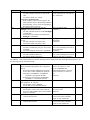
LB Address
9050
9051
9052
9055
9056
Description
Toshiba T/C write enable bit. The user:
Sets ON to enable writing to T/C bits ON &
OFF.
Sets OFF to disable T/C writing.
T1/T1S user’s manual NOTE:
When writing to Timer/Counter registers, the
Timer/Counter’s device data should be added to
the written data. (2 bytes each, corresponding to
the Timer/Counter’s register)
Enable or Disable the touchscreen when the
Backlight is turned OFF. The user:
Sets ON to disable touchscreen when Backlight
is turned OFF.
Sets OFF to keep touchscreen enabled when
Backlight is turned OFF.
Write back enable PLC Control, Change window.
The user:
Sets ON to disable write back to PLC.
Sets OFF to enable write back to PLC.
Disconnect action – PLC communications. The user:
Sets ON to continuously retry any write to PLC
command.
Sets OFF to stop any write to PLC commands.
Disconnect action –Touchscreen The user:
Sets ON to enable touchscreen.
Sets OFF to disable touchscreen.
NOTE
When setting the Timer/Counter‘s
device to ON, use ‘01’; for OFF use
‘00’. (read/write)
Version
Ver 1.5
OFF is the default mode.
(read/write)
Ver 1.6
This applies to Change Window
control only.
(read/write)
Ver 1.6
When HMI is disconnected from the
PLC, it acts according to the state of
this local bit 9055.
(read/write)
When HMI is disconnected from the
PLC, it acts according to the content
of this local bit 9056. (read/write)
Ver 1.6
Ver 1.6
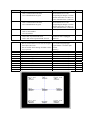
Bits LB9060 ~ 9069, 6080 and 6081 are used for detecting Numeric Input Extend and ASCII Input Extend presses. See
the following page for Touchscreen map.
9070
9071
9090
9091
9092
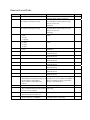
MITSUBISHI J2-S10 driver control
Effects local data being added to ‘R’ or subtracted
from ‘R’.
Set bit ON to disable add/subtract operations
Set bit OFF to enable add/subtract operations
Valid range: 0x00800000 to 0x7FFFFFFF
(8388608 to 2147483647 decimal)
Invalid range: 0xFF799999 to 0x80000000
(-8388608 to –2147483648 decimal).
MITSUBISHI J2-S10 driver control
Write options for ‘R’. The user:
Sets bit ON to write to EPROM.
Sets bit OFF to write to RAM.(default)
Event Log Clear The user:
Sets bit ON to write to clear entries from the
Event Log. This includes entries stored in RW
memory, if enabled.
Adjusts contrast lighter one shade. The user:
Sets bit ON to activate.
Adjusts contrast darker one shade. The user:
Sets bit ON to activate.
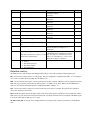
Due to the protocol limitation of J2S100 for ‘R’ registers. A value
between 0x00800000 and
0xFFFFFFFF(inclusive) cannot be
written to R because it creates an
error.
(read/write)
Ver 1.6
(read/write)
Ver 1.6
After the Event log is cleared, this bit Ver 2.5.2
auto resets to OFF.
(read/write)
After the contrast is made lighter, this Ver 2.6.0
bit auto resets to OFF. Hardware
Version 4.5 only.(read/write)
After the contrast is made darker, this Ver 2.6.0
bit auto resets to OFF. Hardware
Version 4.5 only.(read/write)