1
[Ctrl] [N]
Creates new empty file
[Ctrl] [O]
Opens existing file with window
[Ctrl] [S]
Saves current file
[Ctrl] [Shift] [S]
Save as
[Ctrl] [*]
Fits the screen display to the table dimensions
[Ctrl] [/]
Fits the screen display to the outside dimensions
[Ctrl] [+]
Zoom in
[Ctrl] [-]
Zoom out
[Ctrl] []
Scroll right
[Ctrl] []
Scroll left
[Ctrl] []
Scroll up
[Ctrl] []
Scroll down
[Ctrl] [I]
Starts initialisation
[Ctrl] [P]
Moves to park position
[Ctrl] [T]
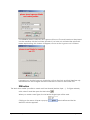
Opens the test clamping window
[Ctrl] [X]
Cut (deletes and copies data to the clipboard)
[Ctrl] [C]
Copies data to the clipboard
[Ctrl] [V]
Pastes data from the clipboard
[Ctrl] [H]
Fixed clamps (only 1001/2001)
[Ctrl] [E]
Opens the input field for notes
[Ctrl] [F]
Opens the font mode
[Ctrl] [Pgup]
Increases the counter
[Ctrl] [Pgdwn]
Decreases the counter
[Ctrl] [Home]
Sets the figure counter to 0
[Alt] [M]
Menu
Spt32 Version 5 Help
Creating and editing layouts • 63