1
Things to know about GUNNAR T2 scribe
6.2
Some special information about how to get the most use of the T2.
Please note: Each pen might differ in the way it draws onto a specific mat board, therefore this settings
may vary.
6.2.1
Configuration Center Settings
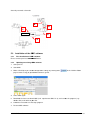
Open up the
Pen Tool.
and advance to the section “Tool Head List”, and open the appropriate
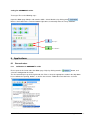
Please make sure the following settings are correct:
•
Uncheck “Use Mat Profile Setting”
•
Uncheck “Use Mat Profile Speed Setting”
•
Uncheck “Auto Tool Change”
These setting can be altered to get the most out of the used pen:
•
Cutting Speed: Setting the draw speed of the pen
•
Air Flow restrictor: Needs to be set, to avoid hitting the mat board to hard with the pen.
7 Guarantee
7.1
Guarantee provisions
The guarantee on the T2 scribe Pen Tool runs for one year as of the date of delivery. The guarantee
covers defects due to material faults or production errors.
Damage due to negligent and incorrect handling is not covered by the guarantee.
Normal wear is similarly excluded from the guarantee (assessment by us). Kindly observe our general
terms and conditions in this respect.
GUNNAR T2 scribe
Guarantee • 14