1
IV.
Report class
The user will probably have to apply several filters, and want a deep analysis of what happened during the
processes. We consider rather painful to read the values in console mode, and even uglier is the fact that,
due to a large amount of values, we would have to ‘pause’ the screen to read it.
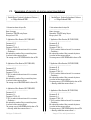
Therefore, we provide an automated tool to have report files, in .txt format. This is implemented by the
class ‘Report’. We use the following functions :
- create : make the header of the report and the first section, dealing with the input file
- addEvent : add a section for the application of a filter. It is provided a unique number so that it is
more comfortable to read, and also a time. By example : 2. Application of filter Quantize (10/15/06 17:08:20)
- addEventParameter : A sub-part of an Event (i.e. a Filter) is the values given to the parameters.
- addEventParameterDescription : To understand the effect of a parameter on the data.
- addEventConclusion : A short text, resuming what happened on the picture, due to the filter.
- printReport : Last step, we print the whole report in a file.
Of course, the user can decide not to have this file. In this case, he just have to turn this option off through
the menu. Because this is a kind of “interface” between two classes, it is implemented in Interface class.
→ Automated report sheet instead of reading incomprehensible values in console mode !
V.
Quantization of a picture
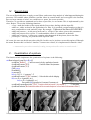
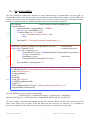
The function which implements the quantization of a picture is the following :
void Quantize(image In, image Out, int B, int A){
rpt.addEvent("Quantize"); // add a new event in the log : application of quantize
rpt.addEventParameter("B",B);
// take the values of the parameter
rpt.addEventParameter("A",A);
if(A>B) return;
Out.setModify();
int constante(2);
for(int i = B-A; i > 1; i--) constante *= 2;
rpt.addEventParameter("2^(B-A)",constante); // also take this value for debuging
for(int m = 0; m < In.getwidth(); m++)
for(int n = 0; n < In.getheight(); n++)
The original ‘Lena’ file
Out.setvalue(((int)In.getvalue(m,n)/constante)*constante,m,n);
rpt.addEventParamaterDescription("2^(B-A)","is made to divide and stretch. It is a constant.");
// description
rpt.addEventConclusion("We reduced the number of bits to encode the picture.\nIt can lead to false contours effects.");
}
Using 1 bit (2 grey levels)
Philippe Giabbanelli
Using 2 bits (4 grey levels)
3
Using 3 bits (8 grey levels)
Images Files and Quantization