1
I.
Image class
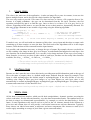
This class is the main one of the application : it takes an image file to parse its content, it can save the
data to multiple format, and it also provide a basic interface for algorithms.
The user only needs to provide a file name. He does not have to choose a file extension from a list,
because it is highly redundant : the type can be determined from the file itself. Therefore, the first
operation performed by open is to find the type. Once we have it, we know if it is in grey level or in
colours ; depending on this answer, we store the data in one or three matrices, dynamically allocated. We
also store all the comments in one variable of type string, using the following algorithm :
char c;
while((c=getc(f)) == '#'){
comment += c;
//
while((c=getc(f)) != '\n') comment += c;
//
comment += "\n";
//
}
ungetc(c, f);
// If the line didn’t begin by a
We take # in the comments
And whatever is after…
…Until the carriage return.
comment, we put the char back
To make it easy, we will work with two instances of this class : one as input and the other as output, each
containing up to three matrices to store the data. The final result of the algorithms will be in the output
instance, while the data will be extracted from the input instance.
It is possible, and sometimes necessary, to change the type of output. By example, the user can decide to
see his resulting color image in three grey-level images, to understand what happened on each layer. Our
save function can do that automatically, as it can take a color image and turn in into a grey-level using a
linear formula ; in our case we chose to take a third of each layer, but there are also many other formulas
available, like Grayx,y = 0.3Redx,y + 0.59Greenx,y + 0.11Bluex,y.
→ The user doesn’t need to say the type of the file : automatically deduced !
→ A colour image can be exported at three layers or turned into grey level !
II.
Interface class
Because we don’t want the user to loose his time by providing non-useful information (such as the type of
file or the name of output), there is a default output name, deduced from the input. By example, if the
input is called myImage.pgm, the default output is myImagebis.pgm. If the user decides to save his
resulting color image in three grey-level images, to see what happen on each layer, then it will
automatically be named myImagebisR.pgm, myImagebisG.pgm, myImagebisB.pgm. Everything related
to names and extensions is in the Interface class.
→ The user doesn’t need to provide any name for the output : a default name is always provided !
III.
Matrix class
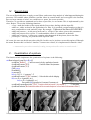
All the data is stored into matrices, which provide basic manipulations : dynamic creation, accessing the
values (read/write), free the allocated memory, copy the data from another matrix. The standard access to
the data is using a two dimensional representations ; by example, we ask for the data Red(x,y). In the
future, if some algorithms really need to refer to a pixel as the i-th element, instead of the element at a
given row and column, then we will provide a conversion between two and one dimension. Typically,
many classes can inherit from matrix to add more and more components, like iterators or mask (if we
want to apply something on a range of pixel from a given center and radius).
Philippe Giabbanelli
2
Images Files and Quantization