1
Introduction
1 Product Overview
1 Safety Information
2 User manual
3 Software upgrade
3 Symbols used on the device
4Setup
Connections
5
6
7
8
Connecting speakers and antenna
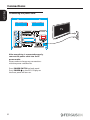
Connecting the power cord
Optional: Connecting TV
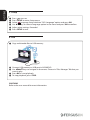
Optional: Connecting a supported USB
devices and memory cards
Major functions
13Playable Discs
13Playable Content
15Basic radio playback controls
16Playing discs
16Basic playback controls
17Operations for video playback (DVD/
VCD/SVCD)
18Playing multimedia files from the USB
device or memory card
Setup Menu Options
19Language Setup menu
19Video setup menu
20Audio setup menu
21General Setup menu
Functional Overview
9 Front and Rear panel
10Remote Control Unit RCU290
Troubleshooting
Getting Started
Specification
11Step 1: Inserting batteries into the
Remote Control
11Step 2: Setting up the TV
12Step 3: Setting language preference
Glossary
ENGLISH
Contents