1
Product Description
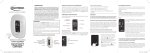
The INVISIO M80 is a wireless remote PTT. Before use,
the dongle and remote PTT must be fitted with your
INVISIO X50 system, instruction for which is contained
within this user manual.
Internal Battery
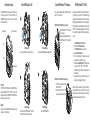
Mount M80 Dongle to X50
1
3
Mount M80 Remote PTT to Weapon
Pair M80 Remote PTT to X50
There are two methods for fitting your M80 Wireless Remote PTT to your weapon:
Your dongle and remote PTT are paired from the factory. If
you wish to pair your remote PTT with a different dongle,
please follow the instructions below. Please note that any
M80 dongle and M80 remote PTT can be paired together.
Pairing multiple devices simultaneously may result in the
remote PTT being inadvertently paired to incorrect dongle.
It is not possible to operate the X50 during the pairing sequence.
M80 Remote PTT with Picatinny rail bracket
1. Slide M80 Remote PTT onto Picatinny
rail on weapon.
2. Insert screw and tighten nut securely.
3. The M80 Remote PTT is now ready for
use.
Picatinny rail bracket
PTT 1
Remove Clip
Remove clip from X50 using a 2 mm Allen key.
Fasten Dongle
Place clip on top of M80 dongle and tighten screws.
PTT 2
Rifle mounting strap
4
2
M80 Remote PTT with Rifle mounting strap
1. Insert rifle mounting strap through
M80 Remote PTT.
2.Position M80 Remote PTT onto
weapon and tighten strap securely.
Transmit
The PTT 1 and PTT 2 buttons on the INVISIO M80 duplicate the INVISIO X50 PTT 1 and PTT 2 buttons. It is
possible to use either the INVISIO X50 or INVISIO M80 for
transmitting, even when paired.
Battery
Replace unit when the INVISIO M80 wireless remote internal battery is fully discharged.
Insert Dongle
Insert dongle into the X50 Remote PTT connector
and push down until the screw holes align.
Fitted Dongle
X50 with M80 dongle fitted.
Turn X50 Mode Switch to OFF position.
Press and hold X50 Audio Selector.
Turn X50 Mode Switch to ● or ●● position.
Release X50 Audio Selector.
After 12 seconds a series of beep tones is heard.
Both devices are now ready for pairing.
6. Press and release M80 Remote PTT buttons in quick
succession: PTT 2 → PTT 1 → PTT 2 → PTT 1
7. Successful pairing is followed by a short sequence of
different tones.
8. Unsuccessful pairing is indicated by the series of
beep tones not changing and timing out.
1.
2.
3.
4.
5.
Repeat if pairing is unsuccessful. If pairing is still unsuccessful the battery of your wireless PTT may be fully discharged and the unit may need replacing. If unsuccessful
the X50 will need to be restarted to function.