1
2
KUMO Connections
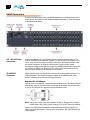
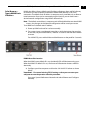
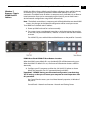
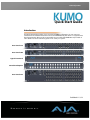
The rear panel illustration points out KUMO connections, including Power, RS-422
Serial Control, RJ45 Ethernet LAN, Reference video, and Video I/O. Each connection
is described briefly below.
KUMO Connections (3232 shown, other models similar)
P/S 1 & P/S 2 Power
Connectors
Power to the KUMO unit is supplied by a power supply brick that accepts a 110220VAC, 50/60Hz power input and supplies +12 VDC to KUMO via connector PS/1
or PS2. Only one power supply is required and may be connected to either of the
two power connectors. An optional second power supply provides power
redundancy to help protect against outages. For additional protection, connect the
two supplies to different AC branch circuits so that KUMO will remain on even if
there is a failure or open circuit breaker on one branch.
RS-422 DB9
Connector
KUMO includes an RS-422 female DB9 connector for making serial connections to
other equipment. This control connection enables interoperability with other
devices, including those that use GVG Native Protocol.
Required RS-422 Adapter
An RS-422 crossover adapter is included with this KUMO router. This adapter should
be attached to the RS-422 connection on the back of the KUMO router if you plan
to use RS-422 protocols for remote control of the KUMO router.
Note: Only KUMO routers with serial numbers ending in -R0 require this adapter.
KUMO routers with serial numbers ending in -R1 do NOT require an adapter.
Connect the male end of the adapter to the KUMO unit, and lightly tighten it in
place using the knurled knobs. Connect your serial cable to the other (female) end
of the adapter.