1
Calibrating Pitch, Roll, & G-Force Gauges
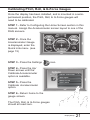
Once the display has been installed, and is mounted in a semipermanent position, the Pitch, Roll, & G-Force gauges will
need to be calibrated.
STEP 1 - Refer to Configuring the Home Screen section in this
manual. Assign the Accelerometer screen layout to one of the
DAQ screens.
STEP 2 - Once the
Accelerometer Gauge
is displayed, enter the
Quick Link menu. (see
page 15)
STEP 3 - Press the Settings
STEP 4 - Press the Up/
Down arrows until the
Calibrate Accelerometer
option is available.
STEP 5 - Press the
Calibrate Accelerometer
option.
icon.
Options
Calibrate Accelerometer
Units: English
Smarty Live Off
Factory Reset
STEP 6 - Return home to the
gauge screen.
The Pitch, Roll, & G-Force gauges
should all read zero.
Display Set Up
21