1
DriveStation Utility Installation
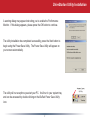
A warning dialog may appear instructing you to enable the Performance
Monitor. If this dialog appears, please press the OK button to continue.
The utility installation has completed successfully, press the Next button to
begin using the Power Save Utility. The Power Save Utility will appear on
your screen automatically.
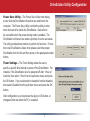
The utility will run everytime you start your PC. It will run in your system tray
and can be accessed by double clicking on the Buffalo Power Save Utility
icon.