1
13
12
11
14
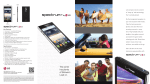
Getting to Know Your Phone
1
10
15
16
2
3
17
18
4
9
5
8
6
7
Calling and Global Network
1.
2.
3.
4.
5.
6.
7.
Earpiece
Volume Up/Down Keys
Touch Screen
Micro USB Charging Port
Home Key
Back Key
Microphone
8.
9.
10.
11.
12.
13.
14.
Menu Key
Recent Apps Key
Proximity Sensor
Camera Lens
Power/Lock Key
Microphone
3.5 mm Headset Jack
15.
16.
17.
18.
At home or around the world, stay connected with friends
and family. Global Roaming on Spectrum2 keeps you in
touch no matter where you travel.
Make a Call
1. From the home screen, touch
.
2. Dial the number you want to call, or start spelling
the name of the desired contact. You will see a list of
contact options. Touch
to expand the list, and touch
a contact to select it.
3. Touch
to place the call.
Use Global Network
1. From the home screen, press
and then touch
Settings. Or, touch
> .
2. Touch More… > Mobile networks > System select >
Network mode.
3. If Global is not selected, touch it to change to Global
Network mode.
4. You can connect to data services while roaming. While
in the Mobile network settings menu, touch Global
data roaming access > Global data roaming* > Yes to
turn it on.
*Global data plan service required. Data access outside the
US may result in significantly higher charges.
Camera Lens
Flash
micro-SIM Card Slot
microSD™ Memory
Card Slot