1
dMloaded sofrkrewillbe ihslalled
sotwre mayEry depsding on opsating
More
ih the SD card and some
s)Elem vssion, hetwork access
nodes, size or other reasons can not be used.
21. V\ihd d6 commnly used ildroid forum
http://{w. mptw coml
http: //sj.9l. .on/
http://uw. andro1d123 ..m/
hrlp //sw. edrord8o oE cn/
http: //Iw. androidin. netlbbs/index. php
http://bbs. zhiqi. con cnAorffi-33 1. htDI
http: //w. androidin. netlbbs,/
http: / /w. hiapk. con/bbs/
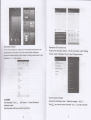
22. How do I dsldo the downloadod sofrwao
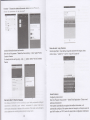
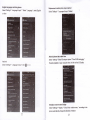
"Settings" - "'Manage app'-',Setect the apptication to be deteted
23. How to vifl mobil6phone veEion infomilioh
"Settings" - "" About phone "mobile phone version inlomation can be
obtained, including the Android version, Linux ve6ion, sofrwaG versifl,
hardMre versioh, etc.
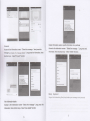
24. How do I copy Slll cad comad infomdion
lnto lhe Cmtads applicatioh. click the menu button, seled,,lmport
Contacts", tha you can see the SIM card contacts, ifonlyto impod oe, you
cah click an item. ll all the import needs to long press the menu key, select
lmport to import all.
25. why th6 mossag€ has a
diffq.il timo sd dd6 display
Message displayed oh the principte that the display of the day time and
shM that non-day
whdhqto suppori theJaE
date have
26.UP520
UP520 suppod JaE,
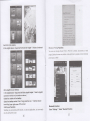
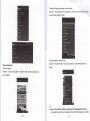
27.How to open developer options
EhEr dle Settihas
6e About phone - click
sysem will be genenEd developer optjoE
-
28
fE
Build number five
tirc,