1
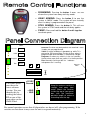
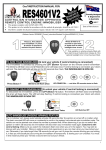
DISARMING: Pressing the button 1 once. This will
disarm the system from away and stay mode.
2
3
1
AWAY ARMING: Press the button 2 to arm the
system in AWAY mode. The system will arm instantly
even if a delay is programmed on the panel.
STAY ARMING: Press the button 3. This will arm
the system in STAY mode and the exit delay applies.
PANIC: Press and hold the button 2 and 3 together
to activate panic.
LED'S
Receive
Red
Valid
Red
Program
Yellow
Run
Green
Receive: On when any data packets are received - even
if codes are not programmed.
Valid: On while valid data is decoded e.g. while Tx is
pressed or PIR transmitting. Flashes 6 times when in
program mode and valid data is received for storage.
Program: On when any switch is in the “on” position,
flashes when more than one switch is in the on position.
Run: Normally flashing at 0.5 Hz - indicates
microprocessor is running.
Antenna
Wire
Add
Delete
ON
1 2 3 4 5 6 7 8
8 8
Bank 1
The SMS8 Panel
must have the
latest software
version. You can
identify this by
reading the letters
RF on one of the
main chips on the
SMS8 Panel.
+12VDC
Ground
+ BUS
- BUS
OFF
Keep the antenna vertical &
straight, and away from
metal. Mount the receiver
inside the top of your panel
box, with the maximum
possible length of antenna
extending from the top.
For normal operation ensure that all dipswitches are down (off) after programming. If the
switches are not down it may cause the unit to respond incorrectly.
2